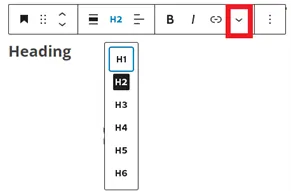
Heading

Headings can be set from level 1 to 6, however, avoid using H1 as each post, page, job or event can have only one Heading 1, and this is already the title.

Headings can be aligned to the left, centre or right, can be linked or edited in other ways in the drop down More function (highlighted on the screenshot).

However, avoid using bold, italics or any other formatting options and stick to the default visuals, in order to maintain consistency across all web pages and websites.

Was this article helpful?
YesNo
RELATED CONTENT

About Tulip

TULIP allows you to manage your back-office functions in the cloud, to achieve more simplicity, transparency and efficiency. It serves as a highly secure and traceable self-service portal that eliminates the burden of paper work, offline processes and the risks involved, over full data digitization and smart automation of workflows. During the past decade, TULIP has become a global platform, accommodating more than 2,800 companies, with over 115,000 users beyond 30 locations.
© TULIP Solutions, all rights reserved.
linkedin facebook pinterest youtube rss twitter instagram facebook-blank rss-blank linkedin-blank pinterest youtube twitter instagram